 2021-01-31 04:58:46 edcepp
HW
Turtlebot3 Burger
Raspberry Pi 3
SW
Ubuntu 18.04
ROS 2 Dashing
Install Procedure
The setup instructions are documented in Section 3.2 "SBC Setup" of the Turtlebot3 eManual
https://emanual.robotis.com/docs/en/platform/turtlebot3/sbc_setup/#sbc-setup
* Section 3.2.1 installs the Ubuntu 19.04 on the micro SD card
* Section 3.2.2 boots up the RPi
* Section 3.2.3 configures the Wifi on the RPi and installs ssh
* Section 3.2.4 adds swap space
* ssh works fine with wlan0 and eht0
* Section 3.2.5 installs ROS 2 Dashing Base
** Step 2a: sudo apt update followed by a reboot does not break wlan0
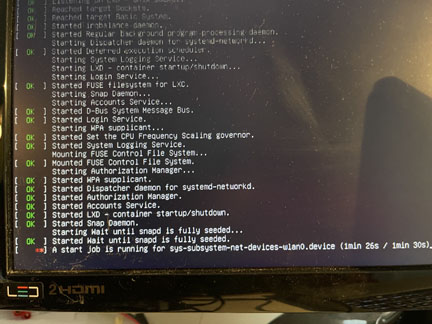
** Step 2b: sudo apt upgrade followed by a reboot leaves wlan0 inoperable. See attached image. The wlan0 boot message from the screen capture is. It times out after 90 seconds and continues to boot.
[ **] A start job is running for sys-subsystem-net-devices-wlan0.device (1min 26s / 1min 30s)_
My Resolution
wlan0 works fine if I skip the upgrade step and go on to install ROS 2.
Questions
What are the ramifications of skipping the upgrade?
Is there a better resolution than skipping upgrade?
Tests
I do not know enough about the networking subsystem to effectively debug the system. I did the following random tests with confirmed a problem with wlan0. I don't know if and how to use this information. Apologies.
ls /sys/class/net
eth0 lo
$ sudo netplan --debug apply
** (generate:5701): DEBUG: 18:10:24.479: Processing input file /etc/netplan/50-cloud-init.yaml..
** (generate:5701): DEBUG: 18:10:24.480: starting new processing pass
** (generate:5701): DEBUG: 18:10:24.481: wlan0: adding wifi AP 'zdome'
** (generate:5701): DEBUG: 18:10:24.481: We have some netdefs, pass them through a final round of validation
** (generate:5701): DEBUG: 18:10:24.481: wlan0: setting default backend to 1
** (generate:5701): DEBUG: 18:10:24.481: Configuration is valid
** (generate:5701): DEBUG: 18:10:24.481: eth0: setting default backend to 1
** (generate:5701): DEBUG: 18:10:24.481: Configuration is valid
** (generate:5701): DEBUG: 18:10:24.482: Generating output files..
** (generate:5701): DEBUG: 18:10:24.482: NetworkManager: definition eth0 is not for us (backend 1)
** (generate:5701): DEBUG: 18:10:24.482: Creating wpa_supplicant config
** (generate:5701): DEBUG: 18:10:24.482: wlan0: Creating wpa_supplicant configuration file run/netplan/wpa-wlan0.conf
** (generate:5701): DEBUG: 18:10:24.482: Creating wpa_supplicant unit /run/systemd/system/netplan-wpa-wlan0.service
** (generate:5701): DEBUG: 18:10:24.492: Creating wpa_supplicant service enablement link /run/systemd/system/systemd-networkd.service.wants/netplan-wpa-wlan0.service
** (generate:5701): DEBUG: 18:10:24.493: NetworkManager: definition wlan0 is not for us (backend 1)
DEBUG:netplan generated networkd configuration changed, restarting networkd
DEBUG:no netplan generated NM configuration exists
DEBUG:eth0 not found in {}
DEBUG:wlan0 not found in {}
DEBUG:Merged config:
network:
bonds: {}
bridges: {}
ethernets:
eth0:
dhcp4: true
dhcp6: true
optional: true
vlans: {}
wifis:
wlan0:
access-points:
xxx:
password: yyy
dhcp4: true
dhcp6: true
DEBUG:Skipping non-physical interface: lo
DEBUG:device eth0 operstate is up, not changing
DEBUG:{}
DEBUG:netplan triggering .link rules for lo
DEBUG:netplan triggering .link rules for eth0
Warning: The unit file, sourcesudo netplan --debug apply configuration file or drop-ins of netplan-wpa-wlan0.service changed on disk. Run 'systemctl daemon-reload' to reload units.
$ systemctl daemon-reload
==== AUTHENTICATING FOR org.freedesktop.systemd1.reload-daemon ===
Authentication is required to reload the systemd state.
Authenticating as: Ubuntu (ubuntu)
Password:
==== AUTHENTICATION COMPLETE ===
$ sudo netplan apply
Warning: The unit file, source configuration file or drop-ins of netplan-wpa-wlan0.service changed on disk. Run 'systemctl daemon-reload' to reload units.
Warning: The unit file, source configuration file or drop-ins of netplan-wpa-wlan0.service changed on disk. Run 'systemctl daemon-reload' to reload units.
$ sudo netplan generate
$ sudo netplan apply
Warning: The unit file, source configuration file or drop-ins of netplan-wpa-wlan0.service changed on disk. Run 'systemctl daemon-reload' to reload units.
$ systemctl daemon-reload
==== AUTHENTICATING FOR org.freedesktop.systemd1.reload-daemon ===
Authentication is required to reload the systemd state.
Authenticating as: Ubuntu (ubuntu)
Password:
==== AUTHENTICATION COMPLETE ===
$ ip a
1: lo: <LOOPBACK,UP,LOWER_UP> mtu 65536 qdisc noqueue state UNKNOWN group default qlen 1000
link/loopback 00:00:00:00:00:00 brd 00:00:00:00:00:00
inet 127.0.0.1/8 scope host lo
valid_lft forever preferred_lft forever
inet6 ::1/128 scope host
valid_lft forever preferred_lft forever
2: eth0: <BROADCAST,MULTICAST,UP,LOWER_UP> mtu 1500 qdisc fq_codel state UP group default qlen 1000
link/ether b8:27:eb:0b:5d:ce brd ff:ff:ff:ff:ff:ff
inet 10.0.0.186/24 brd 10.0.0.255 scope global dynamic eth0
valid_lft 78973sec preferred_lft 78973sec
inet6 fe80::ba27:ebff:fe0b:5dce/64 scope link
valid_lft forever preferred_lft forever
Navigation menu
EdcTalkPreferencesWatchlistContributionsLog out
PageDiscussionReadEditView history
Main Page
ROS2 NUC on TB3
FTC 2020
ROS
ROS Map Survey
Ubuntu Tips
Backup
Navigation
Community portal
Current events
Recent changes
Random page
Help
sitesupport
Tools
|
|
2021-01-31 04:58:46 |
| edcepp | |
2021-02-03 17:05:44 Will Son
Hi,
Thank you for reporting the issue with Raspberry Pi + Ubuntu 18.04.
We'll internally test to see if we can reproduce the issue and get back to you with a resolution.
Thank you for your patience.
|
|
2021-02-03 17:05:44 |
| willson | |
2021-03-25 02:10:54 Hadar
Hi,
I have the same problem with the TurtleBot3 Burger ( Raspberry Pi 3 b+).
Is there any solution?
Thanks,
Hadar
|
|
2021-03-25 02:10:54 |
| hadar_k | |
2021-04-06 14:38:35 Will Son
It turned out that when performing apt update && upgrade, wifi firmware doesn't work anymore.
Please see below thread to download the firmware files and install them.
https://community.robotsource.org/t/sbc-wifi-problem-with-melodic/1995/9?u=robotis-will
Thanks.
|
|
2021-04-06 14:38:35 |
| willson | |
2021-04-08 23:09:11 Hadar
Hi,
In the instruction you sent it says "Use dpkg-divert to stop these files being overwritten on package updates". What is the correct way of doing that?
I tried the following command for each file:
sudo dpkg-divert --divert /lib/firmware/brcm/brcmfmac43455-sdio.bin.distrib --rename /lib/firmware/brcm/brcmfmac43455-sdio.bin
But afterward, I get an error in apt update && upgrade.
What to do?
The error I get:
dpkg-divert: error: mismatch on package
when removing 'diversion of /lib/firmware/brcm/brcmfmac43455-sdio.bin by linux-firmware-raspi2'
found 'local diversion of /lib/firmware/brcm/brcmfmac43455-sdio.bin to /lib/firmware/brcm/brcmfmac43455-sdio.bin.distrib'
dpkg: error while cleaning up:
new linux-firmware-raspi2 package post-removal script subprocess returned error exit status 2
|
|
2021-04-08 23:09:11 |
| hadar_k | |


 Support